
Over the course of this blog I’ve talked about Google Webmaster Central for bloggers, Why I Heart Feedburner and Google’s Blogger: Pros and Cons for Freelance Writers. Today I’m going to talk to you in very general terms about how I use the free web analytics tool called “Google Analytics” on my blog.
Before I do, I’d like to offer that if you’d like to read up on Google Analytics there’s nothing like going straight to the source: you can read the Google Analytics Blog or the ROI Revolution Blog which is the company that performed the training I had attended. Second, web data is not like financial data no matter how many ways you slice and dice it. This means that while every penny may add up in your accounting software; not every visit will “add up” in web analytics so don’t get too obsessed over every, bitty thing.
Since installing GA early January, I’ve been using it to track comparison trends and understand where my traffic is coming from. My goals for my blog are different than a website that sells stuff or offers rapid-fire information; I hope that my content will be useful six months, a year, or even five years from now. I do not have buckets of traffic where I have even 1,000 plus visitors every day. Another way my needs are different from other blogs, is because blogging is a way for me to explore more tools, stay on top of web trends, network, make announcements and offer you my experiences to “pay it forward.” I’m not blogging for dollars; if I was, you’d better believe I’d be doing things differently.
Here’s an example of the comparison view graphs you can use to track trends in Google Analytics.
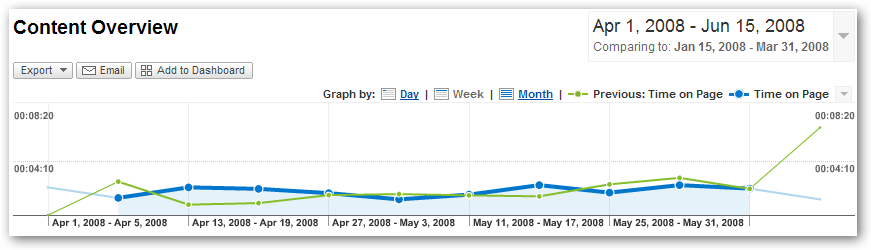
In this example, you can see from the graph how much time people spent on a page. Time on site in Google Analytics is calculated by taking the difference in time between the first page that a reader visits and the second. What you see is the difference between the two timestamps. (For more information, feel free to read this post about the difference between time on page and time on site.) Now, how is this data relevant to me? Well? My traffic dipped in May. By looking at this graph, I can see that regardless of traffic, it looks like visitors spent about the same amount of time for the period I specified on my blog. (Yeah, I know there’s a peak there toward the end, but I know where that came from.) Hmmm…I feel a hypothesis forming.
Next, I’m going to take a comparative view at the page views for the same time period. Notice the spikes.
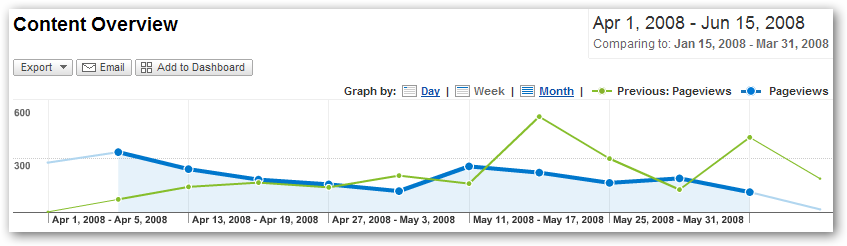
Hmmm…so I know that there were more page views in the first quarter than in the second according to that graph. My traffic has dipped in May, and I know that I didn’t post regularly enough. Lastly, I’m going to take a look at new vs. returning visits (which are based on a six-month time frame according to a cookie that’s set when you visit my blog) and my RSS feed. Look at that! Returning visits are up for the second quarter and so are my RSS feed subscribers. What can I infer from this data?
Let’s recap, okay?
- Goal: Review trends to see if I can find a pattern that will help me increase traffic to my blog.
Review Data: Review first quarter versus second quarter traffic, time on site and page views graphs after identifying any spikes or anomalies (which I had done already). Next, review new vs. returning visits and RSS feed subscribers.
Data Summary: Traffic is down, time on site had little to no changes, page views down, returning visits up, RSS feed subscribers up.
Conclusion: My readers are beginning to stick with me because my returning visits and RSS feed subscribers are up; the reason why my traffic may be down is because I don’t have enough “new” content to attract my existing readers back. The people that do find my blog stick around some, but since I don’t have a very large archive they may either a) check back when there’s more posts or b) subscribe to the feed to preview the headlines and click through to what’s important to them.
Action: Post more frequently and, after time passes, monitoring trends on the types of content I’m posting.
So there you have a preliminary, very basic overview of how I use Google Analytics for my blog. This is just a small example of what I’ve been working with to help me reach my blog’s goals. I’ll talk more about what those goals are in an upcoming post but–rest assured–they are all about you, the reader.
Are you using any type of web analytics software on your blog? If so, which one?


Comments are closed.